In the world of AI, there is so much potential to tap into if you know how to use it right. Not using AI in 2026 is like driving a Ferrari at 50 mph on the highway. Just because you can, doesn’t mean you should.
I have no experience making an app and modest coding experience. I’ve used SAS, but that’s data manipulation and statistics. I’m learning Python, but still new. So making an app? That would be crazy.
Nevertheless, I dived in just to see what we could do.
The Idea
My idea for an app was pretty simple: I wanted an app that only reviews bathrooms. Not the business, not the restaurant, not the hotel. Just the bathroom. Whenever you’re on a road trip or just needing a bathroom in general, how nice would it be to be able to look one up and see whether it’s worth stopping or maybe holding off and waiting a few more miles down the road?
And that is how Throne Tracker was born. (My husband suggested “Shit Talk,” which was hilarious, but probably not app store material.)
The Setup
Before I could build anything, I needed the right tools. I did have my trusty “grad student” (see previous post), but you can’t just use any version of Claude for something like this. I am currently subscribed to the Pro plan and downloaded the Claude desktop app for my MacBook, which includes a feature called CoWork. This is essentially a workspace where Claude can write code, create files, and build things alongside me. It’s where all the magic happened.
Additionally, I downloaded Xcode so I could view the JavaScript code Claude was writing. This wasn’t a necessary step for building the app, but I did it because I wanted to see what the actual code looks like for my own learning. If you’re curious about code but have never written JavaScript before, I’d recommend doing the same. Claude even added comments throughout the code comparing JavaScript concepts to Python, which was incredibly helpful.
The Build
Here’s where it got fun. Once I provided a prompt with my idea, Claude got right to work. We didn’t try to build the whole thing at once. It was a collaborative, step-by-step process. We started with something very basic. I would use it, then provide a suggestion for something to change or add. Looking back, that’s what made it work so well.
- Step 1: The Prototype. We started with a demo version, a simple prototype I could view and give feedback on. It had a map, some fake bathroom listings, and a review system with star ratings. Nothing was live or connected to the internet yet. It was simply there for me get a feel for it as an end user and provide feedback. What did I like? What felt weird? What was missing? This is where I started playing UX designer without even realizing it.
- Step 2: Going Live. Once I was happy with the look and feel, we turned it into a real website I could share with family and friends. This involved creating a GitHub account (where the code lives) and a Vercel account (which hosts the website and makes it accessible to anyone with a link). After uploading some files, I had a genuine, live bathroom review website!
- Step 3: Adding a Real Database. The first version had fake, pre-loaded reviews, which was helpful for seeing how the app worked, but not useful in the real world. So we connected a real cloud database using Supabase. Now, when someone writes a review, it’s stored in the cloud and everyone can see it. We seeded it with 27 real bathrooms across 10 major U.S. cities to give people something to start reviewing.
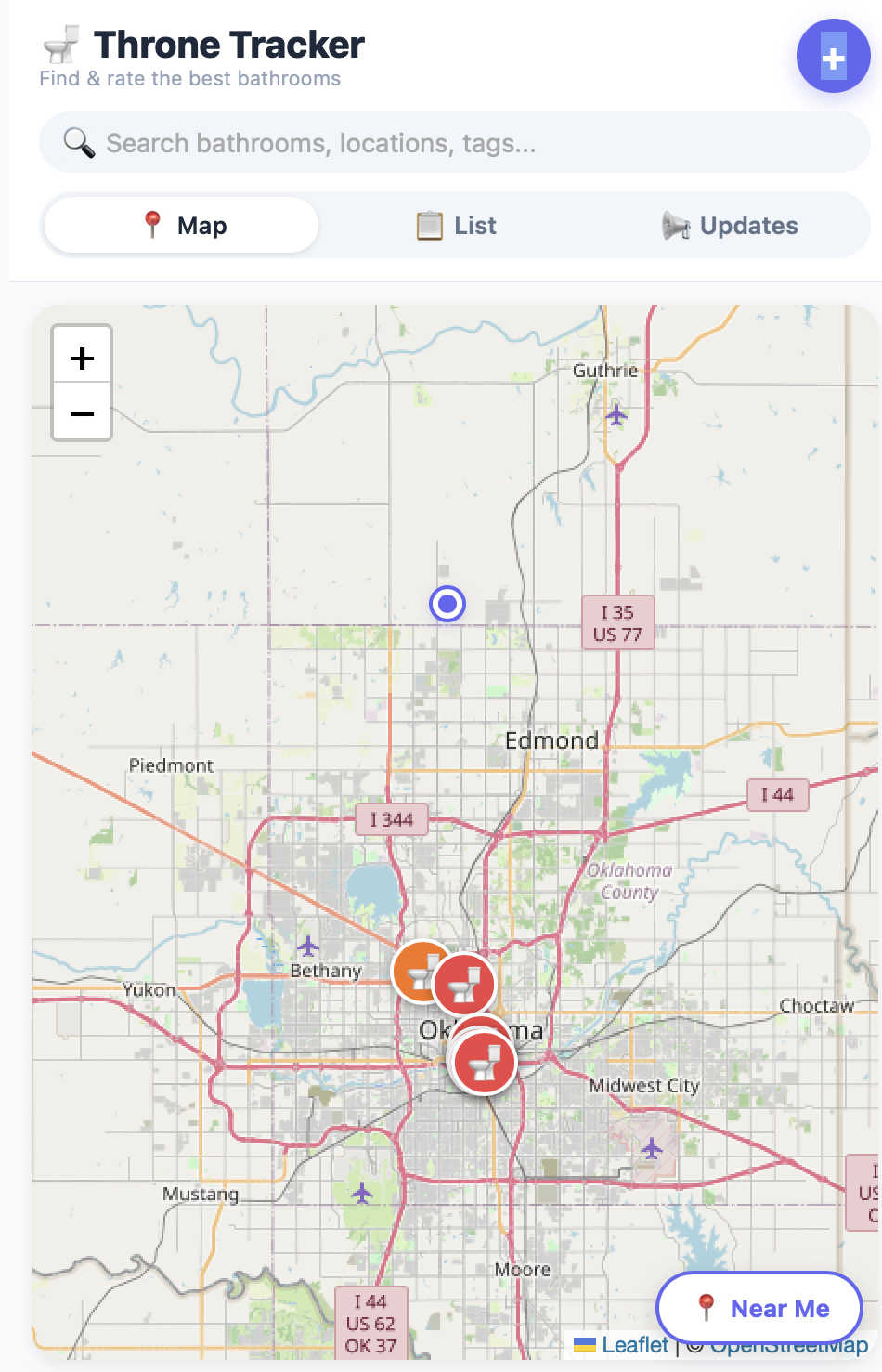
- Step 4: Bug Fixing and UX Feedback. Of course, version 1 was a bit janky. The search bar only let me type one character at a time (I constantly had to click back into it after each letter). I gave that feedback to Claude and it was fixed immediately. I also noticed that searching for a state like “Oklahoma” didn’t zoom the map to that area and that typing “Oklahoma” only showed one of the five OKC bathrooms because it didn’t recognize “OKC” as another name for “Oklahoma City.” Claude added a geographic zoom feature and a smart search system that understands abbreviations. Now “OKC,” “Oklahoma City,” and “Oklahoma” all find the same bathrooms.
- Step 5: Features That Made It Feel Real. This is where it stopped feeling like a project and started feeling like an actual product. We added a “near me” GPS button (to find bathrooms near your own location), poop emoji ratings instead of stars, a badge system to encourage reviews, an updates tab where people can see in real-time our updates, and color-coded app markers to correspond to the rating.
I Guess I Can Add UX Designer to My CV Now?
I was afraid that I wouldn’t feel very involved with Claude doing all of the coding. However, he couldn’t test the app, so I was there to provide feedback on the experience. It truly felt like a collaboration where I brought the ideas and user perspective, and Claude brought the engineering.
This process also taught me a few things:
- You don’t need to know how to code to build something real. I went from zero app development experience to having a live, database-backed web app with interactive maps, GPS location, and a gamification system over the course of a few hours. While some prior coding experience may have helped me appreciate how literal directions need to be when given to a computer, the key was knowing what I wanted and being willing to give detailed feedback.
- AI is a collaborator, not a magic button. Claude didn’t just read my mind and produce a perfect app. I had to describe what I wanted, test what it built, and clearly explain what wasn’t working. The more specific my feedback was, the better the results got. It’s a conversation, not a command.
- Start small, iterate fast. We didn’t try to build everything at once. We started with a prototype, got it working, then added features one at a time. Each round of feedback made the app better. I imagine software development works like this in the real world, and it felt natural even as a complete beginner.
Throne Tracker is live right now and I’ve started sharing it with a few friends and family. In all honesty, I don’t actually think this will become a real app for the world to use. There are already similar apps out there. I wanted to prove to myself that, with a good collaborator, I could do it. And I did. I’ll post the link below, with a disclaimer that I’m currently using free accounts on GitHub, Vercel, and Supabase, so there may come a time where it no longer works.
Try Throne Tracker: thronetracker.vercel.app
Here’s a screenshot to prove that it really existed though.


Leave a Reply